A smart lock is a modern security device that allows you to lock and unlock doors using a smartphone, fingerprint, PIN code, or other digital methods instead of a traditional key. These intelligent locking systems offer enhanced security, remote access, and seamless integration with smart home technology. In this guide, you’ll learn about smart lock door systems, how they work, their key features and benefits, and some of the best models available today.
What Is a Smart Lock?
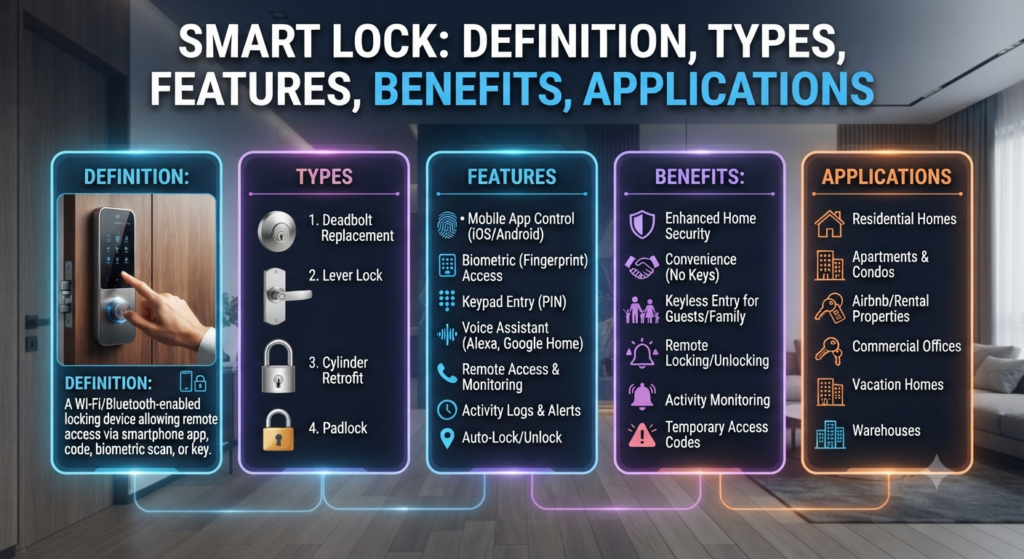
A smart lock is an electronic locking device that lets you lock and unlock a door using digital authentication methods instead of a traditional key. Depending on the model, you can use a smartphone, fingerprint, PIN code, Bluetooth, Wi-Fi, or voice assistant to gain access.
The smart lock meaning refers to a keyless security system that provides convenient and secure access to homes, offices, and commercial buildings. In simple terms, the smart lock definition is an intelligent door lock that combines electronic hardware, wireless communication, and software to control who can enter a property.
A smart lock door is simply a door fitted with one of these electronic locking systems. Most smart locks can be installed on existing doors without replacing the entire door, making them a practical upgrade for modern security.
How Smart Locks Work
A smart lock replaces the manual locking mechanism with an electronically controlled motor. Instead of turning a key, the lock responds to a verified digital credential such as a fingerprint, PIN code, smartphone, or RFID card.
When a user requests access, the lock’s internal microcontroller checks the authentication data. This information may come from a biometric sensor, a keypad, a Bluetooth connection, or a Wi-Fi network. If the credentials match the stored data, the controller activates a small electric motor that rotates the deadbolt or latch, unlocking the door.
Many modern smart locks communicate wirelessly using technologies such as Bluetooth, Wi-Fi, Zigbee, Z-Wave, or Matter. This connectivity allows users to lock or unlock the door remotely through a smart lock app, monitor entry logs, receive instant notifications, and grant temporary access to family members, guests, or service providers.
To improve security, most models use encrypted communication to protect data exchanged between the lock and connected devices. If the batteries run low or the network is unavailable, many smart locks still provide backup access through a mechanical key, emergency power input, or an offline PIN code.
By combining electronic authentication, wireless communication, and automated locking mechanisms, a smart lock offers greater convenience while maintaining a high level of security.
Main Components of a Smart Lock
A smart lock combines mechanical hardware with electronic technology to provide secure and convenient keyless access. Although features vary by manufacturer, most smart locks include the following essential components.
1. Locking Mechanism
The locking mechanism is the physical part of the smart lock that secures the door. It usually consists of a deadbolt or latch operated by a small electric motor instead of a traditional key. Most smart locks also include a manual override, allowing the door to be unlocked with a mechanical key during power or battery failures.
Some advanced models include a door position sensor that detects whether the door is open or closed. This feature helps prevent accidental unlocking, supports auto-lock functions, and sends alerts if the door is left open.
2. Authentication Interface
The authentication interface is how users verify their identity before gaining access. Depending on the model, it may include a touchscreen keypad for entering a PIN, a fingerprint scanner for biometric verification, an RFID or NFC reader, or Bluetooth connectivity for smartphone access. Many locks also support voice commands when connected to compatible smart home systems.
3. Electronic Control Unit
The electronic control unit acts as the brain of the smart lock. It contains a microcontroller that processes authentication requests, controls the motor, stores user credentials, and manages security features such as encryption and access permissions. Many smart locks also incorporate a security encryption chip or secure element to protect stored credentials and encrypt communication between the lock and connected devices.
4. Wireless Communication Module
A built-in wireless module enables the smart lock to communicate with mobile devices and home automation systems. Depending on the model, it may support Bluetooth, Wi-Fi, Zigbee, Z-Wave, Thread, or Matter, allowing remote operation, activity monitoring, firmware updates, and smart home integration.
5. Smart Lock App
Most smart locks are paired with a dedicated smart lock app, which allows users to lock or unlock the door remotely, create temporary digital keys, monitor entry records, receive security alerts, and manage multiple users from a single interface.
6. Digital Keys
Digital keys eliminate the need for physical keys by providing secure electronic credentials. These virtual keys can be shared instantly with family members, guests, or service providers and can be restricted by date, time, or access duration. This makes them especially useful for vacation rentals, offices, and shared properties.
7. Power Supply
Since smart locks rely on electronic components, they require a reliable power source. Most models operate on replaceable or rechargeable batteries and provide low-battery warnings well before power is depleted. Some also include emergency USB power ports or backup battery connections to ensure access during battery failure.
Together, these components enable a smart lock to deliver secure, convenient, and intelligent access control while integrating seamlessly with modern smart home ecosystems.
Smart Lock App
A smart lock app is a mobile application that lets you control and monitor your smart lock using a smartphone or tablet. Instead of relying on a physical key, you can lock or unlock the door, manage user access, and receive real-time security updates from virtually anywhere with an internet connection.
Most smart lock manufacturers offer dedicated apps for Android and iOS devices. These apps provide a simple interface for configuring the lock, checking its status, and integrating it with other smart home devices.
Features of a Smart Lock App
A typical smart lock app includes several useful features, such as:
- Remote Locking and Unlocking: Control your door from anywhere using your smartphone.
- Digital Key Management: Create, share, or revoke digital keys for family members, guests, or service personnel.
- Temporary Guest Access: Set time-based or one-time access permissions for visitors without handing over a physical key.
- Real-Time Notifications: Receive alerts whenever the door is locked, unlocked, or accessed.
- Activity History: View detailed logs showing who entered the property and at what time.
- Battery Monitoring: Check the battery level of the smart lock and receive low-battery warnings.
- Multiple Lock Management: Control several smart locks installed at different locations from a single app.
- Smart Home Integration: Connect the lock with platforms such as Google Home, Amazon Alexa, Apple HomeKit, or Samsung SmartThings for voice control and home automation.
Security Features
To protect user data and prevent unauthorized access, smart lock apps typically include advanced security measures such as end-to-end encryption, secure authentication, biometric login, and two-factor authentication (2FA). Many apps also allow administrators to instantly remove access permissions if a phone is lost or a digital key is no longer needed.
A well-designed smart lock app not only makes keyless entry more convenient but also gives homeowners greater control over property access, improving both security and day-to-day usability.
Key Features of Modern Smart Locks
Modern smart locks combine intelligent electronics, wireless connectivity, and advanced security technologies to provide greater convenience and protection than traditional locks. Depending on the model, they offer a wide range of features designed for residential, commercial, and rental properties.
Biometric Authentication
Many premium smart locks use biometric technology to verify a user’s identity before granting access. Common biometric options include fingerprint scanning, facial recognition, and palm vein recognition. These methods provide highly accurate authentication, allowing users to unlock the door quickly without carrying keys or remembering PIN codes.
Multiple Unlocking Methods
Modern smart locks support several access methods, ensuring flexibility and convenience for different users and situations. Depending on the model, you can unlock the door using:
- Fingerprint recognition
- Smartphone app
- PIN code
- RFID or NFC card
- Bluetooth
- Voice commands
- Mechanical backup key
Having multiple unlocking options ensures reliable access even if one method is unavailable.
Smart Home Integration
Many smart locks seamlessly integrate with popular smart home platforms such as Google Home, Amazon Alexa, Apple HomeKit, Samsung SmartThings, and Matter-compatible devices. This integration allows users to control locks with voice commands or automate routines. For example, unlocking the front door can automatically switch on lights, adjust the thermostat, or deactivate the home security system.
Remote Access and Activity Monitoring
Wi-Fi-enabled smart locks allow homeowners to lock or unlock doors remotely using a mobile device. They can also monitor door status, review access history, receive real-time notifications, and create temporary digital keys for guests, family members, or service personnel from virtually anywhere.
Intelligent Security Features
Modern smart locks incorporate multiple security technologies to prevent unauthorized access. Features such as encrypted communication, tamper detection, incorrect PIN protection, automatic locking, and detailed activity logs help improve overall security while giving users complete control over who enters the property.
Built-in Camera and AI Motion Detection
Some high-end smart locks include an integrated high-definition camera with AI-powered motion detection. These systems can detect visitors, monitor package deliveries, recognize movement near the entrance, and send instant alerts with live video to the homeowner’s smartphone, providing an additional layer of security.
Reliable Power Management
Since smart locks operate electronically, dependable power management is essential. Most models are powered by long-lasting batteries and provide low-battery warnings well before replacement is required. Many also include emergency power options, such as a USB-C port or external battery connection, allowing the lock to function even if the batteries are fully discharged.
Durable and Weather-Resistant Design
Smart locks are designed to withstand daily use and varying environmental conditions. Many models feature durable metal construction, weather-resistant housings, and corrosion-resistant finishes, making them suitable for both indoor and outdoor installation in different climates.
These advanced features make modern smart locks a practical solution for homeowners seeking improved security, convenient keyless access, remote management, and seamless integration with today’s smart home technology.
Smart Door Lock with Fingerprint
A smart door lock with fingerprint uses biometric technology to identify authorized users by scanning their fingerprints before unlocking the door. Since every fingerprint is unique, this authentication method provides a higher level of security than traditional keys or PIN codes while offering quick and convenient access.
The fingerprint scanner captures the user’s fingerprint, converts it into an encrypted digital template, and compares it with the fingerprints stored in the lock’s memory. If a match is found, the internal motor releases the deadbolt, allowing the door to open within seconds.
Most fingerprint smart locks support multiple unlocking methods to ensure reliable access in different situations. In addition to fingerprint recognition, users can unlock the door using a smartphone app, PIN code, RFID or NFC card, Bluetooth, voice assistants, or a mechanical backup key.
A smart door lock with fingerprint provides fast, keyless access while improving security and convenience. Since fingerprints are unique, they are much harder to duplicate than traditional keys or PIN codes. Many models also support multiple unlocking methods, including a smartphone app, PIN code, RFID card, and a mechanical backup key, ensuring reliable access in any situation. It is an excellent choice for homes, apartments, offices, and rental properties.
Key Features
- High-speed biometric authentication
- Storage for multiple authorized fingerprints
- Smartphone app control and remote access
- Temporary digital keys for guests
- Automatic locking after the door closes
- Real-time access notifications and activity logs
- Encrypted fingerprint data for improved security
- Low-battery alerts and emergency backup access
- Integration with popular smart home platforms
Benefits of Smart Locks
Smart locks offer several advantages over traditional locking systems by improving security, convenience, and access management. Whether installed in a home, office, or rental property, they provide greater control over who can enter your premises.
Enhanced Security
Modern smart locks use advanced encryption, biometric authentication, and tamper-resistant technologies to reduce the risk of unauthorized access. Features such as automatic locking, real-time alerts, and activity logs help ensure doors remain secure even when you’re away.
Greater Convenience
A smart lock eliminates the need to carry physical keys. Users can unlock doors using a smartphone, fingerprint, PIN code, or other digital credentials. Remote access also allows homeowners to lock or unlock doors from virtually anywhere and create temporary digital keys for family members, guests, or service providers.
Better Access Management
Smart locks make it easy to monitor and control property access. Homeowners can view entry history, receive instant notifications when the door is used, and revoke access at any time. This is particularly useful for landlords, Airbnb hosts, offices, and shared properties where user permissions need to be managed efficiently.
Smart Home Compatibility
Many smart locks integrate with popular home automation platforms, allowing them to work alongside lighting, security cameras, alarms, and voice assistants. This creates a more connected and automated home while improving both security and everyday convenience.
Disadvantages of Smart Locks
Although smart locks provide convenience and advanced security features, they also have some limitations that should be considered before purchasing one.
Dependence on Battery Power
Most smart locks operate on batteries that require periodic replacement. If the batteries are completely discharged and no backup unlocking method is available, access to the door may become difficult.
Possible Connectivity Issues
Wireless communication problems, software bugs, or smartphone app failures may temporarily affect the lock’s performance. Although these issues are usually infrequent, they can be inconvenient.
Cybersecurity Concerns
Internet-connected smart locks may be exposed to cyber threats if strong passwords, encryption, and firmware updates are not maintained. Choosing reputable brands and keeping the software updated helps reduce these risks.
Higher Initial Investment
Compared to conventional door locks, smart locks generally have a higher purchase price. Some models may also require additional accessories, such as a smart hub, for full functionality.
Installation Complexity
While many smart locks are designed for DIY installation, certain doors may require adjustments or professional installation to ensure proper alignment and reliable operation.
Door Security Still Matters
A smart lock cannot compensate for a weak door or damaged frame. Overall home security depends on the strength of the door, hinges, strike plate, and the quality of the lock installation.
Types of Smart Locks
Smart locks are available in different designs to suit various security needs, door types, and installation requirements. The most common types include:
Smart Deadbolts
Smart deadbolts replace a conventional deadbolt with an electronic locking system. They provide keyless entry, remote control, and advanced security features, making them one of the most popular choices for residential homes.
Retrofit Smart Locks
Also known as adapted smart locks, these devices fit over an existing deadbolt without replacing the entire lock. They are ideal for homeowners and renters who want smart functionality while keeping their original key and exterior hardware.
Keypad Smart Locks
Keypad smart locks allow users to unlock the door by entering a PIN code instead of using a physical key. They are widely used in homes, offices, apartments, and rental properties where multiple users require access.
Fingerprint Smart Locks
Fingerprint smart locks use biometric authentication to verify a user’s identity. They provide quick, secure, and keyless access while eliminating the need to carry keys or remember passcodes.
Bluetooth Smart Locks
Bluetooth smart locks communicate directly with a nearby smartphone, enabling keyless entry without an internet connection. They are easy to install, consume less power, and are suitable for everyday residential use.
Wi-Fi Smart Locks
Wi-Fi smart locks connect to the internet, allowing users to lock or unlock doors remotely, receive security notifications, and manage access from anywhere through a mobile app.
Hybrid Smart Locks
Hybrid smart locks combine multiple unlocking methods, such as fingerprint recognition, PIN codes, smartphone apps, RFID or NFC cards, Bluetooth, and mechanical keys. They offer maximum flexibility and reliable backup access if one authentication method is unavailable.
Smart Locks with Key Access
Some smart locks retain a traditional key cylinder alongside electronic controls. This design provides the convenience of digital access while ensuring a mechanical key can still be used during battery failure or emergencies.
Highest Rated Smart Locks
Several manufacturers consistently receive excellent reviews for security, reliability, and ease of use. Some of the highest rated smart locks include:
| Smart Lock | Best For |
|---|---|
| Yale Assure Lock 2 | Smart home integration |
| Schlage Encode | Built-in Wi-Fi |
| August Wi-Fi Smart Lock | Retrofit installation |
| Ultraloq U-Bolt Pro | Fingerprint access |
| Aqara Smart Lock | Apple HomeKit users |
| Level Lock+ | Hidden smart technology |
| SwitchBot Lock Pro | Existing deadbolt upgrades |
The best choice depends on your budget, preferred ecosystem, and security requirements.
Best Value Smart Lock
Finding the best value smart lock means balancing price, security, and features.
Look for models that include:
- Mobile app support
- PIN code access
- Fingerprint reader
- Auto lock
- Activity history
- Emergency key backup
- Long battery life
Mid-range models often provide excellent functionality without the premium price.
Smart Lock vs Traditional Lock
The following table compares smart locks and traditional locks across key features. While traditional locks rely on physical keys for access, smart locks offer modern capabilities such as remote control, fingerprint authentication, PIN codes, activity tracking, and automatic locking, making them more convenient and secure for many homes and businesses.
| Feature | Smart Lock | Traditional Lock |
|---|---|---|
| Physical Key | Optional | Required |
| Remote Access | Yes | No |
| Fingerprint Access | Available | No |
| PIN Code | Yes | No |
| Smartphone Control | Yes | No |
| Activity History | Yes | No |
| Temporary Access | Yes | No |
| Auto Lock | Yes | No |
How to Choose the Right Smart Lock
Choosing the right smart lock depends on your security requirements, door type, and preferred access method. Before making a purchase, consider the following factors.
Door Compatibility
Check whether the smart lock is compatible with your door’s thickness, handing, and existing lock or deadbolt. Some models replace the entire lock, while retrofit smart locks can be installed over an existing deadbolt.
Unlocking Methods
Select a smart lock that offers the access methods you use most often. Fingerprint recognition is ideal for everyday convenience, while PIN codes, smartphone apps, RFID cards, and mechanical backup keys provide additional flexibility for family members and guests.
Connectivity
Decide how you want to control the lock. Bluetooth models are energy-efficient and work when your smartphone is nearby, whereas Wi-Fi-enabled locks allow remote access, real-time notifications, and cloud-based management from anywhere.
Security Features
Look for features such as encrypted communication, biometric authentication, tamper alerts, automatic locking, and activity logs. These functions provide better protection against unauthorized access and improve overall security.
Battery and Backup Access
Choose a lock with long battery life, low-battery notifications, and an emergency power option, such as a USB-C port or mechanical key, to avoid being locked out if the batteries are depleted.
Smart Home Compatibility
If you already use a smart home system, ensure the lock supports platforms such as Google Home, Amazon Alexa, Apple HomeKit, Samsung SmartThings, or Matter for seamless integration and voice control.
Installation and Budget
Consider how easy the lock is to install and whether it fits your budget. A model with reliable performance, regular software updates, and a good warranty often provides better long-term value than simply choosing the least expensive option.
By evaluating these factors, you can choose a smart lock that offers the right balance of security, convenience, and reliability for your home or business.
Smart Lock Installation Tips
For the best results:
- Verify door thickness and deadbolt compatibility.
- Replace batteries as recommended by the manufacturer.
- Enable two-factor authentication in the smart lock app.
- Regularly update the lock firmware.
- Create strong administrator passwords.
- Keep a backup mechanical key in a secure location.
- Test the auto-lock function after installation.
Common Applications of Smart Lock
Smart locks are used in a wide range of residential and commercial settings to improve convenience, security, and access management. Some of their most common applications include:
Front Door Security: Homeowners can unlock their main entrance using a fingerprint, PIN code, smartphone, or voice assistant, eliminating the need to carry physical keys.
Temporary Guest Access: Property owners can create time-limited access codes for guests, visitors, cleaners, or maintenance personnel. These codes automatically expire after the scheduled period.
Remote Monitoring and Control: Users can lock or unlock doors from anywhere and receive real-time notifications whenever someone enters or exits, helping them keep track of property access.
Securing Secondary Entrances: Smart locks are also widely installed on side doors, back doors, garages, and home offices to provide the same level of protection and remote access as the main entrance.
Smart Home Automation: Many smart locks integrate with smart home ecosystems, allowing them to work with security cameras, video doorbells, lighting systems, and voice assistants to create automated routines and enhanced home security.
These applications demonstrate why smart locks have become a popular choice for modern homes, rental properties, offices, and small businesses by combining enhanced security with everyday convenience.
Conclusion
A smart lock provides a modern, secure, and convenient alternative to traditional door locks. With features such as smartphone control, fingerprint recognition, remote access, activity tracking, and smart home integration, it offers significantly greater flexibility and security.
Whether you are upgrading your home, managing a rental property, or improving office access control, choosing the right smart lock door system can enhance both safety and everyday convenience. By understanding the smart lock meaning, exploring its key features, and comparing the highest rated smart locks, you can confidently select the best value smart lock that meets your security and lifestyle needs.
Frequently Asked Questions
A smart lock is an electronic locking device that allows users to unlock doors using a smartphone, fingerprint, PIN code, or other digital authentication methods instead of a traditional key.
Yes. High-quality fingerprint smart locks use encrypted biometric data and advanced authentication methods, making them more secure than many traditional locks when properly configured.
The best value smart lock depends on your needs, but models that combine fingerprint access, mobile app control, PIN entry, and reliable battery life generally provide the best balance between price and features.
Yes. Most smart locks include a dedicated smart lock app that allows remote locking, unlocking, monitoring, and user management.